


Apple Magic TrackPad
Apple Magic Trackpad – Precision and Fluid Control at Your Fingertips
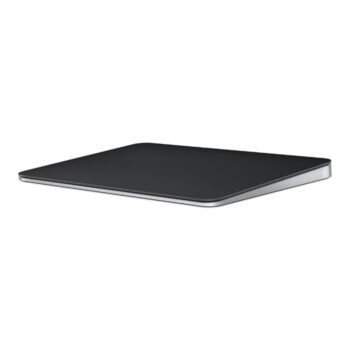
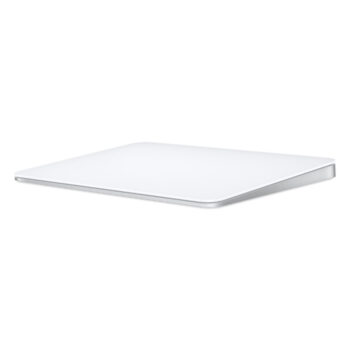
The Apple Magic Trackpad is the ultimate input device for your Mac. Whether you’re navigating your Mac’s user interface, editing photos, or gaming, this highly responsive trackpad gives you control like never before. Designed with a sleek aluminum finish and packed with Force Touch technology, the Magic Trackpad is perfect for those who demand precision, fluidity, and comfort in their workspace.
With multi-touch gestures, force-sensitive input, and a large surface area for swiping and clicking, the Apple Magic Trackpad provides a seamless, intuitive experience for both work and play.
📍 Available at: Bazaar Plaza, 8th Floor, Room 853, Kimathi Street, Moi Avenue, Nairobi
📞 Call/WhatsApp: 0704328559
🌐 Buy Now: Apple Magic Trackpad – iPhoneCare Kenya
📧 Email: contact@example.com
📋 Product Specifications – At a Glance
| Feature | Details |
|---|---|
| Product Name | Apple Magic Trackpad |
| Connectivity | Bluetooth wireless |
| Charging | Rechargeable via Lightning cable |
| Battery Life | Up to 1 month per charge |
| Surface Area | 6.3” x 5.1” (160 x 130 mm) |
| Multi-Touch Gestures | Yes – Support for up to four fingers |
| Force Touch | Yes |
| Compatibility | Works with MacBooks and Macs running macOS 10.12 or later |
| Build Quality | Aluminum finish with glass surface |
| Color | Silver (aluminum) |
| Weight | 0.4 kg |
🌟 Key Features of Apple Magic Trackpad
1. Large, Precision-Engineered Surface
The Apple Magic Trackpad is built for precision. With a spacious surface area, you can glide effortlessly across it, making multi-tasking and navigation smoother and faster. Perfect for graphic designers, photo editors, and those who want more space for detailed gestures.
2. Force Touch Technology
Take control with Force Touch! This revolutionary feature senses how much pressure you apply, allowing you to perform additional actions. Pressing harder for more options or shortcuts makes tasks like editing videos, drawing, or coding incredibly efficient.
3. Multi-Touch Gestures
Support for multi-touch gestures—like pinch, swipe, and tap—gives you a whole new level of interactivity. Effortlessly switch between apps, scroll through documents, or navigate complex software interfaces with ease.
4. Wireless and Rechargeable
No more worrying about changing batteries. The Apple Magic Trackpad is wireless, connects via Bluetooth, and can be charged quickly using the included Lightning cable. Enjoy up to a month of use with a single charge.
5. Seamless Integration with macOS
Designed specifically for Apple products, the Magic Trackpad integrates seamlessly with macOS, offering you native macOS gestures such as Mission Control, Spotlight, and App Exposé. It’s optimized for smooth navigation and improved productivity on your Mac.
✅ Pros & ❌ Cons
| ✅ Pros | ❌ Cons |
|---|---|
| Smooth, responsive multi-touch gestures | Not ideal for Windows or non-Mac users |
| Large trackpad surface for precision | Higher price point compared to other trackpads |
| Built-in Force Touch for extra functionality | Requires Lightning cable for charging |
| Sleek, premium aluminum finish | Heavier than some other trackpad models |
| Rechargeable battery lasts up to 30 days | Limited to Bluetooth-compatible devices |
💼 Perfect For:
- Designers & Photographers – Ideal for precise movements and detailed editing
- Developers & Coders – Easy to integrate into your workflow with customizable gestures
- Creative Professionals – Makes photo, video, and graphics editing smoother
- Home Offices – Elegant addition to your Mac workstation
📦 What’s in the Box?
- Apple Magic Trackpad
- Lightning to USB Cable for charging
- Quick Start Guide
🛒 Related Products (Internal Links)
- Apple Magic Keyboard – Perfect for seamless typing
- Apple Magic Mouse 2 – For an alternative sleek experience
- MacBook Pro – Perfect companion for your trackpad
- Mac mini – Powerful, compact desktop for creators
Learn more about Force Touch and multi-touch gestures for your Apple devices:
🔗 Apple’s Official Magic Trackpad Guide





Reviews
There are no reviews yet.